*책 내용과 다르게, 다음과 같은 환경에서 프로젝트 생성
- Windows11(윈도우 11) 환경
- 자바 JDK 17 버전 설치 https://yungenie.tistory.com/11
[Java] 차근차근 Java 설치하기 (JDK17, Window 11)
자바 개발 도구 설치 방법에 대해서 알아보겠습니다. Java17은 LTS(Long Term Support : 장기 지원) 릴리즈로 1년 후까지 기술 지원 및 버그를 개선한 서비스를 제공받을 수 있습니다. 업데이트 버전을 꾸
yungenie.tistory.com
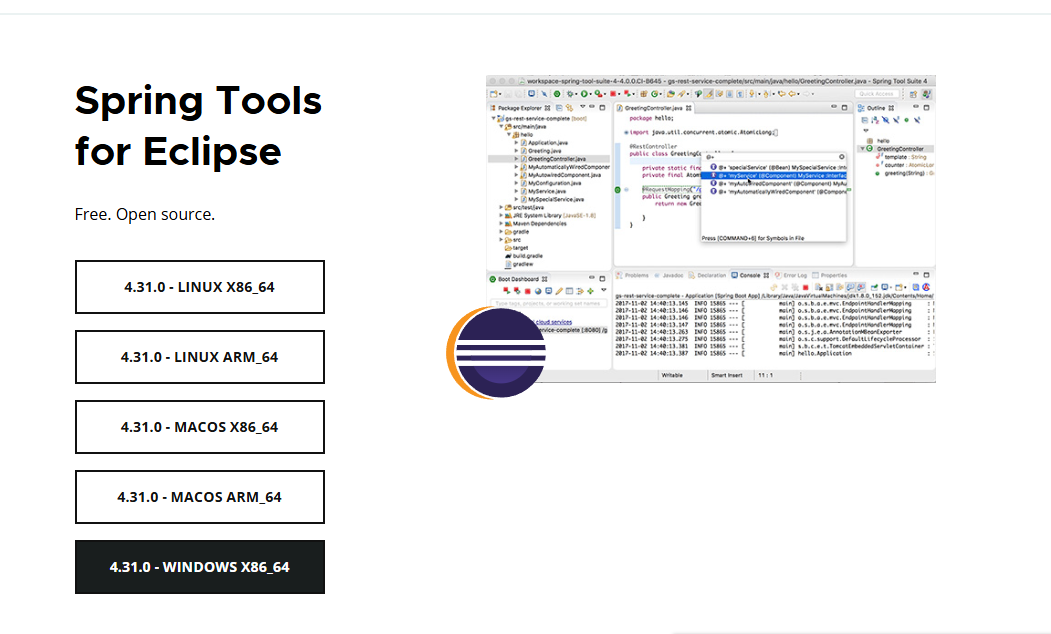
- 스프링 부트 4.31.0 사용 - STS(Spring Tool Suite) 설치(Spring Tools for Eclipse - https://spring.io/tools)
=> https://priming.tistory.com/147 참고
[Windows] Spring Tool Suite 4(STS 4) 다운로드 및 설치
STS란?Spring Tool Suite(STS)는 스프링 프로젝트를 생성하고, 개발할 수 있게 해주는 도구입니다. STS 설치 과정에 대해 설명드리겠습니다. 설치 파일 다운로드STS 공식 사이트에서 설치 파일을 다운로
priming.tistory.com
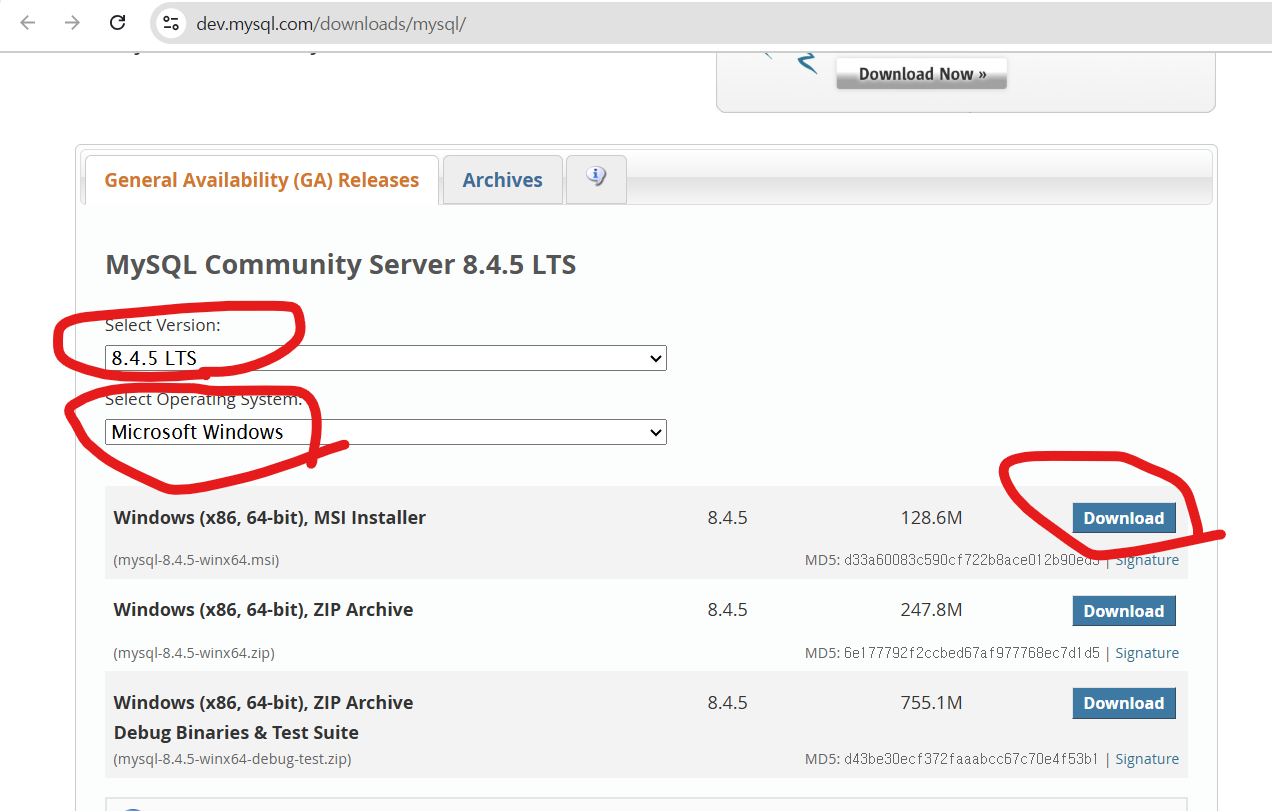
- MySQL Community Server 8.0.42 설치 https://dev.mysql.com/downloads/mysql/
MySQL :: Download MySQL Community Server
Select Version: 9.3.0 Innovation 8.4.5 LTS 8.0.42 Select Operating System: Select Operating System… Microsoft Windows Ubuntu Linux Debian Linux SUSE Linux Enterprise Server Red Hat Enterprise Linux / Oracle Linux Fedora Linux - Generic Oracle Solaris mac
dev.mysql.com
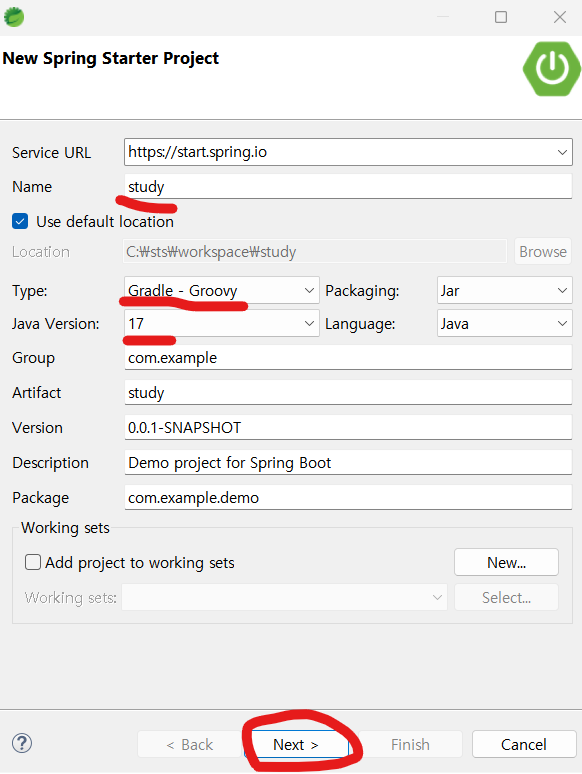
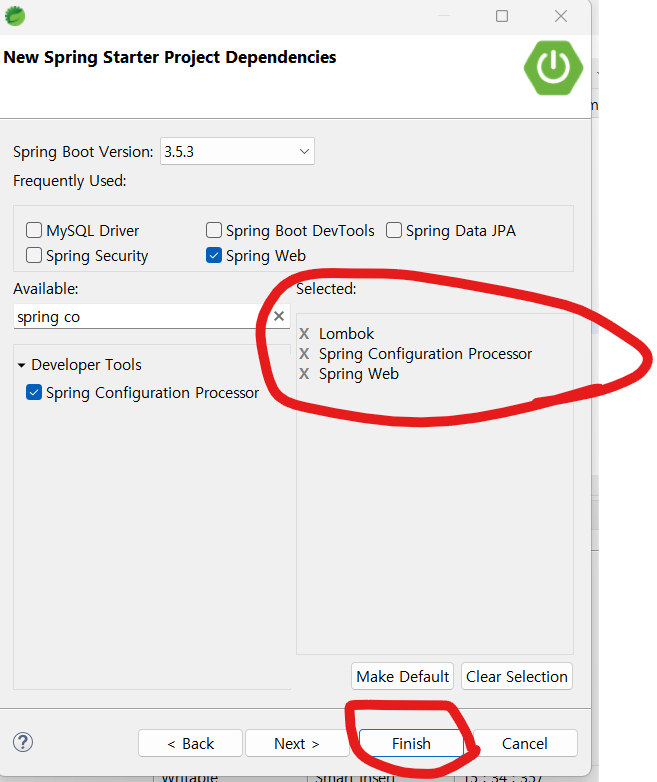
- Gradle
**STS에서 Gradle 프로젝트 생성한 과정

*** 함께 보면 좋은 글
스프링 부트 핵심 가이드(장정우 지음) - 개발에 앞서 알면 좋은 기초 지식
1. 서버 간 통신마이크로서비스 아키텍처에서 한 서버가 다른 서버에 통신을 요청하는 것을 의미-> 한 대는 서버/다른 한 대는 클라이언트가 됨 가장 많이 사용되는 방식은 HTTP/HTTPS 방식(TCP/IP, SOA
keep-programming-study.tistory.com
스프링부트 핵심 가이드(장정우 지음) - 서버 간 통신 1: RestTemplate
*** 함께 보면 좋은 글2025.07.11 - [스프링(Spring), 스프링부트(SpringBoot)/스프링부트(SpringBoot) 기초] - 스프링 부트 핵심 가이드(장정우 지음) - 개발에 앞서 알면 좋은 기초 지식 한 대는 서버/다른 한
keep-programming-study.tistory.com
1. WebClient 개요
- 스프링부트 최신 버전에서는 RestTemplate의 지원이 중단되어, WebClient를 사용할 것을 권고
- Spring WebFlux에서 HTTP 요청을 수행하는 클라이언트로 제공
- 리액터(Reactor) 기반으로 동작하는 API로, 스레드와 동시성 문제를 벗어나 비동기 형식으로 사용 가능
-> 리액터(Reactor): Java에서 리액티브 프로그래밍을 구현한 라이브러리 중 하나로, 이벤트 스트림(event stream) 기반으로 데이터의 흐름을 비동기적으로 처리할 수 있도록 도움
1) WebClient의 주요 특징
(1) 논블로킹(Non-Bolcking) I/O 지원
- 요청을 보낼 때 서버 스레드가 기다리지 않고, I/O 작업이 끝날 때만 알림을 받아 처리
- 동시에 많은 요청을 처리할 수 있고, 스레드 점유가 적어 서버 리소스를 아낄 수 있음
WebClient.create()
    .get()
    .uri("https://api.example.com/data")
    .retrieve()
    .bodyToMono(String.class); // 요청 보내고 바로 반환, 나중에 결과 받음
(2) 리액티브 스트림(Reactive Streans)의 백 프레셔(Back Pressure) 지원
- 데이터가 너무 빨리 들어오면 소비자가 처리 속도를 따라갈 수 있도록 조절할 수 있음
- 한쪽이 너무 빨리 데이터를 보내서 시스템이 다운되는 것을 방지
(3) 적은 하드웨어 리소스로 동시성 지원
- 많은 요청을 동시에 처리할 수 있으며, 그러면서도 스레드를 많이 쓰지 않음
- 비유: 기존 스레드 방식은 1000개 요청 처리하려면 1000개 스레드 필요 → 메모리 부담
WebClient는 10~20개 스레드로 1000개 요청 처리 가능
(4) 함수형 API 지원
- 데이터를 다루는 과정에서 map, flatMap, filter 같은 함수형 연산을 자연스럽게 지원
- 코드가 깔끔하고, 데이터 처리 로직 쉽게 연결 가능
webClient.get()
    .uri("/users")
    .retrieve()
    .bodyToFlux(User.class)
    .filter(user -> user.isActive())
    .map(User::getName);
(5) 동기, 비동기 상호작용 지원
- WebClient는 Mono/Flux를 반환하기 때문에 기본적으로 비동기 지원, .block()을 사용하여 동기 지원
// 비동기
Mono<String> result = webClient.get().uri("/data").retrieve().bodyToMono(String.class);

// 동기
String data = result.block(); // 결과 올 때까지 기다림
(6) 스트리밍 지원
- 서버가 데이터를 조각(스트림)으로 보내도 점진적으로 처리 가능
- 큰 데이터 파일, 실시간 이벤트, SSE(Server-Sent Events) 처리에 적합
Flux<ServerEvent> eventStream = webClient.get()
    .uri("/events")
    .retrieve()
    .bodyToFlux(ServerEvent.class);
2) WebClient 구성 방법
- 기존 프로젝트에서, build.gradle의 dependencies에 WebFlux 의존성 추가
-> 저장한 후 우클릭 한 다음 Gradle => Refresh Gradle Project 클릭
dependencies {
    ... 생략 ...

	/// WebClient 구성을 위한 WebFlux 모듈 의존성 추가
	implementation 'org.springframework.boot:spring-boot-starter-webflux'
}
2. WebClient 사용하기
1) WebClient 구현(코드 작성)
(1) GET 요청 구현: WebClientService.java 생성
- defaultHeader(): WebClient의 기본 헤더 설정
- defaultCookie(): WebClient의 기본 쿠키 설정
- defaultUriVariable(): WebClient의 기본 URI 확장값 설정
- filter(): WebClient에서 발생하는 요청에 대한 필터 설정
- 복제: WebClient clone = webClient.mutate().build();
package com.example.demo.service;


import org.springframework.http.HttpHeaders;
import org.springframework.http.HttpStatus;
import org.springframework.http.MediaType;
import org.springframework.http.ResponseEntity;
import org.springframework.stereotype.Service;
import org.springframework.web.reactive.function.client.WebClient;
import org.springframework.web.util.UriBuilder;

import reactor.core.publisher.Mono;

@Service
public class WebClientService {
	 /**
     * 단순 GET 요청
     * - baseUrl: http://localhost:9090
     * - 기본 Header: Content-Type = application/json
     * - /api/v1/crud-api 엔드포인트 호출 후 문자열 응답 반환
     */
	public String getName() {
		WebClient webClient = WebClient.builder()
				.baseUrl("http://localhost:9090")
				.defaultHeader(HttpHeaders.CONTENT_TYPE,  MediaType.APPLICATION_JSON_VALUE)
				.build();

		return webClient.get()
				.uri("/api/v1/crud-api")
				.retrieve()
				.bodyToMono(String.class)
				.block();
	}

	/**
     * PathVariable을 포함한 GET 요청
     * - /api/v1/crud-api/{name} 엔드포인트 호출
     * - {name} 자리에 "Flature" 값 삽입
     * - 응답을 ResponseEntity<String>으로 받아 Body 반환
     */
	public String getNameWithPathVariable() {
		WebClient webClient = WebClient.create("http://localhost:9090");

		ResponseEntity<String> responseEntity = webClient.get()
				.uri(uriBuilder -> uriBuilder.path("/api/v1/crud-api/{name}")
						.build("Flature"))
				.retrieve().toEntity(String.class).block();

		return responseEntity.getBody();
	}

	/**
	 * Query Parameter를 포함한 GET 요청
	 * - 요청 대상: http://localhost:9090/api/v1/crud-api?name=Flature
	 * - UriBuilder를 사용해 queryParam("name", "Flature") 추가
	 * - exchangeToMono()로 응답 처리:
	 *   - 상태 코드가 200 OK일 경우 Body를 String으로 반환
	 *   - 그 외에는 예외를 발생시킴
	 * - block()으로 Mono를 동기적으로 실행해 최종 문자열 응답 반환
	 */
	public String getNameWithParamenter() {
		WebClient webClient = WebClient.create("http://localhost:9090");

		return webClient.get().uri(uriBuilder -> uriBuilder.path("/api/v1/crud-api")
				.queryParam("name", "Flature")
				.build())
			.exchangeToMono(clientResponse -> {
				if (clientResponse.statusCode().equals(HttpStatus.OK)) {
					return clientResponse.bodyToMono(String.class);
				} else {
					return clientResponse.createException().flatMap(Mono::error);
				}
			})
			.block();
	}
}
(2) POST 요청 구현: WebClientService.java에 코드 추가
package com.example.demo.service;


import org.springframework.http.HttpHeaders;
import org.springframework.http.HttpStatus;
import org.springframework.http.MediaType;
import org.springframework.http.ResponseEntity;
import org.springframework.stereotype.Service;
import org.springframework.web.reactive.function.client.WebClient;
import org.springframework.web.util.UriBuilder;

import com.example.demo.jpa.data.dto.MemberDto;

import reactor.core.publisher.Mono;

@Service
public class WebClientService {
	... 생략 ...
    	/**
	 * POST 요청 (Query Parameter + Body)
	 * - 요청 대상: http://localhost:9090/api/v1/crud-api
	 * - Query Parameter: name, email, organization
	 * - Body: MemberDto 객체(JSON으로 직렬화)
	 * - 응답: MemberDto를 ResponseEntity로 받아 반환
	 */
	public ResponseEntity<MemberDto> postWithParamAndBody() {
	    WebClient webClient = WebClient.builder()
	            .baseUrl("http://localhost:9090")
	            .defaultHeader(HttpHeaders.CONTENT_TYPE, MediaType.APPLICATION_JSON_VALUE)
	            .build();

	    MemberDto memberDto = new MemberDto();
	    memberDto.setName("flature!!");
	    memberDto.setEmail("flature@gmail.com");
	    memberDto.setOrganization("Around Hub");

	    return webClient.post().uri(uriBuilder -> uriBuilder.path("/api/v1/crud-api")
	            .queryParam("name", "Flature")
	            .queryParam("email", "flature@wikibooks.co.kr")
	            .queryParam("organization", "wikibooks")
	            .build())
	        .bodyValue(memberDto)
	        .retrieve()
	        .toEntity(MemberDto.class)
	        .block();
	}


	/**
	 * POST 요청 (Custom Header + Body)
	 * - 요청 대상: http://localhost:9090/api/v1/crud-api/add-header
	 * - Body: MemberDto 객체(JSON으로 직렬화)
	 * - Header: "my-header" = "WkBooks API"
	 * - 응답: MemberDto를 ResponseEntity로 받아 반환
	 */
	public ResponseEntity<MemberDto> postWithHeader() {
	    WebClient webClient = WebClient.builder()
	            .baseUrl("http://localhost:9090")
	            .defaultHeader(HttpHeaders.CONTENT_TYPE, MediaType.APPLICATION_JSON_VALUE)
	            .build();

	    MemberDto memberDto = new MemberDto();
	    memberDto.setName("flature!!");
	    memberDto.setEmail("flature@gmail.com");
	    memberDto.setOrganization("Around Hub");

	    return webClient
	            .post()
	            .uri(uriBuilder -> uriBuilder.path("/api/v1/crud-api/add-header").build())
	            .bodyValue(memberDto)
	            .header("my-header", "WkBooks API")
	            .retrieve()
	            .toEntity(MemberDto.class)
	            .block();
	}

}
'스프링(Spring), 스프링부트(SpringBoot) > 스프링부트(SpringBoot) 기초' 카테고리의 다른 글
| 스프링부트 핵심 가이드(장정우 지음) - 스프링 시큐리티(Spring Security)와 JWT 1편 (1) | 2026.04.10 |
|---|---|
| 스프링부트 핵심 가이드(장정우 지음) - 스프링 시큐리티(Spring Security) 개요 (0) | 2026.03.26 |
| 스프링부트 핵심 가이드(장정우 지음) - 서버 간 통신 1: RestTemplate (1) | 2026.03.03 |
| 스프링부트 핵심 가이드(장정우 지음) - 액추에이터 주요 기능 살펴보기, 액추에이터 커스텀 기능 만들기 (0) | 2026.02.19 |
| 스프링부트 핵심 가이드(장정우 지음) - 예외 처리 에러 해결, 액추에이터 활용하기 (0) | 2026.02.04 |